
How Often Should You Move for Desk Job Posture?
Last Updated: November 16, 2026
Quick Summary
Take a short movement break every 30 to 45 minutes, with a longer break every hour to 90 minutes, standing, walking, or stretching for one to three minutes each time. This schedule interrupts the static loading that makes desk job posture painful, and frequent short breaks beat one long one.
- Accumulate at least two to four minutes of walking or standing movement every hour.
- Standing still is not a break, so pair standing with walking or stretching.
- Do the two-minute neck and shoulder stretch routine mid-morning and mid-afternoon.
- Build the habit in layers, starting with two daily reminders in week one.
- Track longest unbroken sit and end-of-day discomfort, and judge trends over two to three weeks.
Table of Contents
- Why Desk Job Posture Needs a Schedule, Not Willpower
- How Often to Take Breaks From Sitting at Work
- Set Up Your Ergonomic Desk Setup First
- Desk Stretches for Neck and Shoulders You Can Do in Two Minutes
- Desk Job Posture Exercises That Build Lasting Support
- How to Make a New Routine Stick (and Know It's Working)
- When Desk Job Posture Tension Needs a Professional Assessment
- Build Your Posture Reset Plan With a Chiropractor
- Frequently Asked Questions
Why Desk Job Posture Needs a Schedule, Not Willpower
Most people know they should sit up straight. They just can't remember to do it for eight hours, and attention always loses to a deadline. Prolonged static sitting strains the body regardless of how good posture looks in the moment. (Source: Canadian Centre for Occupational Health and Safety guidance on ergonomics, NHS guidance on the risks of sitting too much)
This guide from Cafe of Life Chiropractic Studio covers how often to move, stretch, and reset your posture during the workday.
The problem with static posture
Your body is built to move, not to hold one shape for eight hours. When you sit still, the same muscles stay switched on and the same joints stay loaded. That's static posture, and it's the part of desk work that causes trouble.
Muscle fatigue builds quietly. Then neck pain, shoulder tension, or lower back pain shows up at 4 p.m. and you blame your chair.
What the evidence says about break frequency
The honest answer: there's no single magic number. Guidance on break frequency varies, and much of it is based on general ergonomics principles rather than one definitive trial.
What most practitioners agree on is direction, not precision. More frequent, shorter movement breaks beat one long one. And standing alone isn't enough if you stand still.
So treat the schedule below as a starting point, not a rule.
How Often to Take Breaks From Sitting at Work
A common approach is a short movement break every 30 to 45 minutes, with a longer break every hour to 90 minutes. Aim to stand, walk, or stretch for one to three minutes each time. These brief intervals can also help ease the stiffness that builds during prolonged sitting, making practical tips for desk strain relief a useful next step.
Why the advice varies, and how to reconcile it
You'll see recommendations ranging from every 20 minutes to once an hour. They're not really contradicting each other; they're answering different questions.
Interrupt static posture every 30 to 45 minutes. Accumulate at least two to four minutes of walking or standing movement every hour. If you can only do one, interrupt more often rather than move longer once.
Movement breaks vs. exercise breaks
These are not the same thing, and conflating them is why many routines fail.
- Movement breaks are short, low-effort interruptions: standing, walking to fill a water bottle, shoulder rolls, a lap around the room. They're frequent, they don't require a change of clothes, and they're the backbone of the schedule.
- Exercise breaks are structured strength or mobility work: the desk stretches and posture exercises later in this guide. They're longer, less frequent, and build capacity over weeks.
A workable pattern is movement breaks every 30 to 45 minutes and one or two exercise breaks per day, plus three dedicated strength sessions per week outside the workday.
Adapting the schedule to your work situation
A single schedule won't fit every desk job. Adjust the frequency and format to your setup:
- Laptop-only users: the screen and keyboard are locked together, so you can't optimize both. Raise the laptop on a stand or stack of books and add an external keyboard and mouse. Take a movement break every 30 minutes because the setup is inherently compromised.
- Standing desk users: standing still is not a break. Alternate 20 minutes sitting, 8 minutes standing, and 2 minutes moving, and don't stand for more than 45 minutes continuously.
- Long meetings or calls: you can't walk out every 30 minutes. Stand during audio-only calls, take standing stretch breaks during video calls when appropriate, and use the first five minutes after a meeting ends as a movement break before returning to the desk.
A sample break schedule for an 8-hour day
| Time | Action | Duration |
|---|---|---|
| 9:00 | Set chair and monitor, feet flat | 2 min setup |
| 9:30 | Stand, shoulder rolls, walk to fill water | 2 min |
| 10:00 | Desk stretch: neck and shoulders | 2 min |
| 10:45 | Walk, 5 minutes | 5 min |
| 11:30 | Stand and reset posture | 1 min |
| 12:30 | Lunch walk | 10 min |
| 2:00 | Desk stretch and shoulder rolls | 2 min |
| 3:00 | Walk, 5 minutes | 5 min |
| 4:00 | Stand, stretch, reset | 2 min |
Duration
Set phone reminders for the first two weeks. After that, the pattern starts to feel automatic.
Watch out: if you use a standing desk as your only break strategy, you can end up standing still for long stretches, which loads the low back and legs just as static sitting loads the hips and spine. Pair standing with walking or stretching.
Set Up Your Ergonomic Desk Setup First
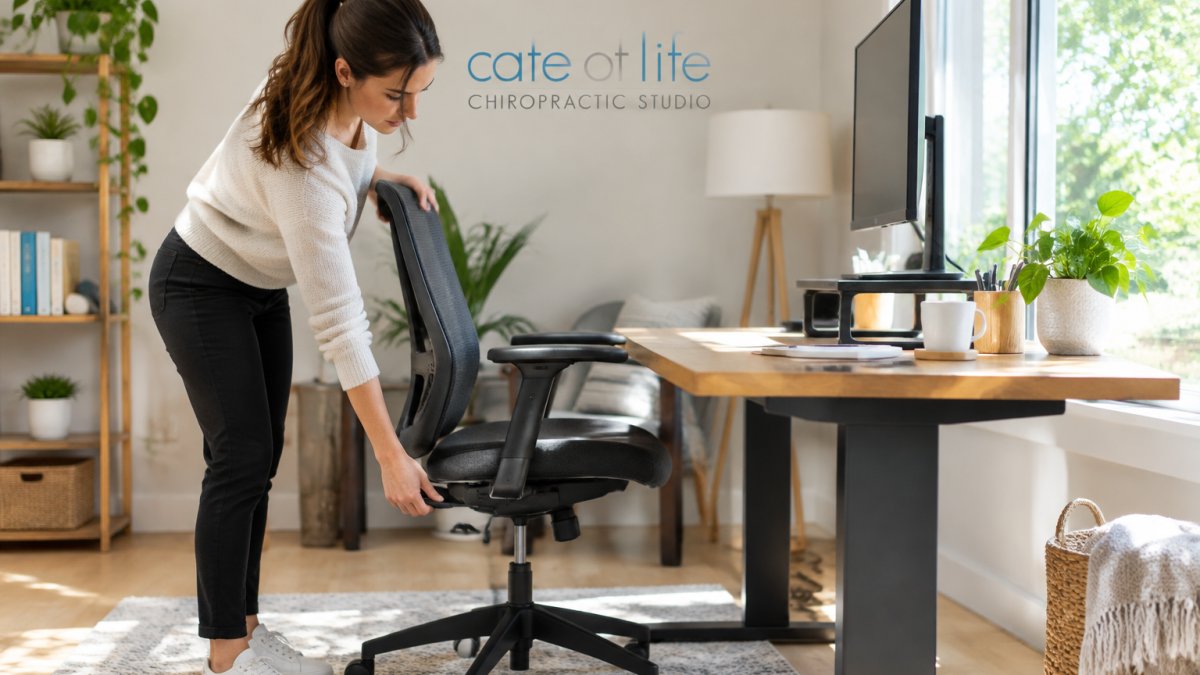
A break schedule can't fix a workstation that forces you into a bad shape. Get the ergonomic desk setup right, and the breaks do more.
Chair height, back support, and foot placement
- Chair height: feet flat on the floor, knees level with or slightly below hips (CCOHS: Working in a Sitting Position)
- Back support: lumbar support fills the curve of your lower back
- Foot support: if your feet dangle, use a footrest
Monitor, keyboard, and mouse positioning
- Monitor: top of the screen at or just below eye level, about an arm's length away
- Keyboard: elbows near 90 degrees, wrists straight, not bent up or down
- Mouse: close to the keyboard, so you're not reaching
Keep the items you use most inside your power zone (OSHA: Computer Workstations eTool), roughly the area between shoulder and waist height, close to your body.
If you want the full walkthrough, our step-by-step guide to fixing desk job posture covers setup in detail.
Desk Stretches for Neck and Shoulders You Can Do in Two Minutes
Here's a quick desk stretches for neck and shoulders routine. Do it once mid-morning and once mid-afternoon.
- Chin tuck: pull your chin straight back, hold 5 seconds, repeat 5 times
- Shoulder rolls: roll shoulders back 10 times, then forward 10 times
- Neck side stretch: tilt ear to shoulder, hold 20 seconds each side
- Chest opener: clasp hands behind back, gently lift and open the chest, hold 15 seconds
- Upper trap stretch: gently tilt head, hold 20 seconds each side
Move slowly. Stretching should feel like a release, not a pull (Mayo Clinic: Stretching, focus on flexibility).
For a deeper routine, see our stretches for shoulder pain from sitting.
Desk Job Posture Exercises That Build Lasting Support
Stretching feels good. Strength is what holds the new position. These desk job posture exercises target the muscles that support neutral posture.
- Wall angels: stand with back to wall, slide arms up and down, 10 reps
- Seated rows with a band: pull band toward ribs, squeeze shoulder blades, 12 reps
- Glute bridges: lie down, lift hips, hold 3 seconds, 10 reps
Do these three times a week. Core strength and upper back strength make good posture easier to hold without thinking about it.
How to Make a New Routine Stick (and Know It's Working)
A routine only works if it survives a busy Tuesday. Here's how to make it stick.
A two-week implementation plan
Don't change everything at once. Build the habit in layers:
- Week 1: Set up your workstation properly once. Add two phone or calendar reminders per day, one mid-morning and one mid-afternoon. Do the two-minute stretch routine at each reminder.
- Week 2: Add a short walk at lunch and one mid-afternoon movement break. Keep the same two reminders.
- Week 3 onward: Add a third reminder if the first two feel automatic. Introduce the strength exercises three times per week.
Reminder and timer options
You don't need a special app. A phone alarm labeled with the action ("stand and walk") works. Calendar pop-ups work if you live in your calendar. Many smartwatches and fitness trackers have stand reminders or move reminders built in.
Keep the reminder low-disruption: a vibration or a single chime, not a full-screen alert that pulls you out of focus.
Low-disruption movement options
When you can't leave your desk, these still count as a break from static posture:
- Stand up and sit down five times
- Walk to the farthest water fountain or washroom
- Take a phone call standing
Measuring whether it's helping
Posture cues alone are a poor measure because you can't reliably feel your own alignment. Track behavior and symptoms instead:
- Sitting duration: note roughly how long your longest unbroken sit was each day.
- Break adherence: mark whether you hit your planned breaks, not whether you sat "perfectly."
- Discomfort or fatigue: rate neck, shoulder, and low back tension at the end of each day on a 1-to-10 scale, and note end-of-day fatigue.
A simple paper log or a note on your phone is enough. Look at the trend over two to three weeks, not any single day.
Watch out: don't judge the routine by a single bad day. A stressful deadline week will skew your numbers, so compare weekly averages rather than daily scores.
For a realistic schedule and timeline, our guide on how often to work on posture correction goes deeper.
When Desk Job Posture Tension Needs a Professional Assessment
Some tension settles with movement and a better setup. Some doesn't. Watch for these signs:
- Pain that lasts more than a couple of weeks
- Numbness, tingling, or weakness in the arm or hand
- Headaches that build through the workday
If any of these sound familiar, get assessed. A qualified professional can check how your spine and joints move and rule out other causes. This is general information, not a diagnosis.
At Cafe of Life Chiropractic Studio, we offer chiropractic care for posture and movement disorders for office workers dealing with neck and shoulder tension. Call 519-439-5353 to book an appointment.
Build Your Posture Reset Plan With a Chiropractor
A chiropractor can help you turn a generic schedule into a plan that fits your body and your workday.
That matters if you've tried stretching and it hasn't held. Our guide on how often to see a chiropractor and how to choose one walks through both questions.
Cafe of Life Chiropractic Studio takes a natural, drug-free approach.
Your posture won't fix itself between meetings. It needs a schedule, a setup, and a way to check it's working.
At Cafe of Life Chiropractic Studio, we offer a natural, drug-free approach to care, with a holistic focus on mobility and posture.
Frequently Asked Questions
How often should you take a break from sitting at a desk?
A practical target is a short movement break every 30 to 45 minutes, with a longer 5 to 10 minute break every hour. The 20-8-2 rule offers a simple structure: sit for 20 minutes, stand for 8, and move for 2. Set a timer for the first week so the pattern becomes automatic. Even standing up and walking to refill your water counts as a movement break.
What are the best desk stretches for neck and shoulders?
Try shoulder rolls, a gentle chin tuck, and a seated neck stretch where you tilt your ear toward your shoulder and hold for 15 to 20 seconds per side. A doorway chest stretch also helps counter rounded shoulders. Do these every hour or during your scheduled break. Move slowly and stop if you feel sharp pain. If tension persists despite stretching, a posture assessment can identify what is driving it.
Does sitting all day cause poor posture?
Prolonged sitting encourages a forward head position and rounded shoulders, especially when your screen is too low or your chair lacks lumbar support. Static posture also causes muscle fatigue. The fix is not a single perfect position but frequent changes: adjust your ergonomic desk setup, take movement breaks every 30 to 45 minutes, and add desk job posture exercises that strengthen your core and upper back.
How do I know if my posture routine is actually helping?
Track three things for two weeks: how often you notice neck or lower back pain, how many breaks you actually take, and how you feel at the end of the workday. If tension drops and you are completing most scheduled breaks, the routine is working. If pain worsens, spreads, or includes numbness or tingling, stop and book an assessment with a qualified professional.