
Fix Desk Job Posture Tension: A Step-by-Step Guide
Table of Contents
- Understanding Desk Job Posture Tension
- Step 1: Assess Your Current Workstation Setup
- Step 2: Ergonomic Desk Setup Tips for Neutral Spine Alignment
- Step 3: Desk Stretches for Neck and Shoulder Pain Relief
- Step 4: Movement Breaks and Dynamic Routines
- Step 5: Chiropractic Adjustments for Posture Correction
- Step 6: Post-Work Recovery and Tension Management
- Common Mistakes to Avoid
- Frequently Asked Questions
Last Updated: September 27, 2026
Understanding Desk Job Posture Tension
Desk job posture tension is the muscle strain and discomfort that builds up from sitting in poor alignment for hours. At Cafe of Life Chiropractic Studio, we see this pattern constantly: office workers develop tight shoulders, forward head posture, and lower back pain because their workstations aren't set up for neutral spine alignment. (Source: Statistics Canada's 2021 data)
The problem isn't laziness or weakness. It's that most people inherit a desk setup designed for convenience, not biomechanics. Your monitor sits too low. Your chair doesn't support your lumbar spine. Your keyboard forces your wrists into awkward angles. Over weeks and months, these small misalignments create repetitive strain that compounds.
The good news: fixing desk job posture tension doesn't require expensive equipment or hours of daily stretching. It requires three things: proper workstation geometry, specific movement breaks, and targeted stretches that counteract static loading. Below, we'll walk you through each step.
Step 1: Assess Your Current Workstation Setup
Before you change anything, understand what's creating the tension. Spend five minutes observing your natural sitting position right now.
Ask yourself these questions:
- Where do your eyes naturally fall when you look straight ahead? Are you looking down at your screen or up at it?
- How does your lower back feel against the chair? Is there a gap, or is your spine pressed against the backrest?
- Where are your feet? Dangling, flat on the floor, or tucked under the chair?
- How far is your keyboard from your body? Do your elbows bend at roughly 90 degrees?
- Are your shoulders relaxed or hunched forward?
Write down what you notice. This baseline tells you exactly which adjustments will matter most. Most people discover they're doing at least three things that create tension: monitor too low, chair too high, and keyboard too far away.
Step 2: Ergonomic Desk Setup Tips for Neutral Spine Alignment
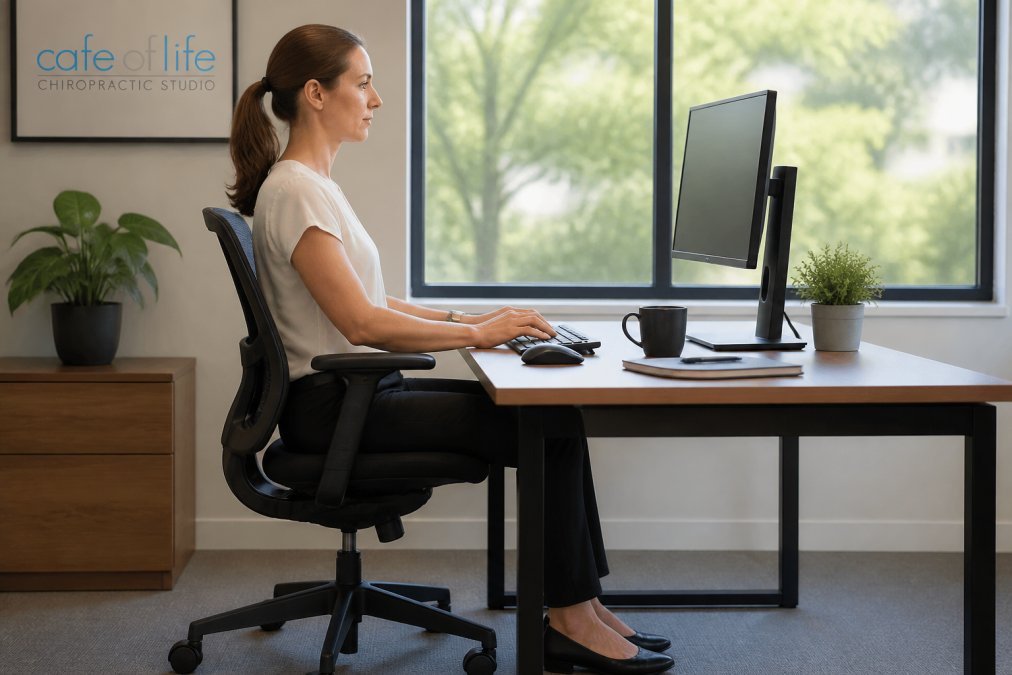
Neutral spine alignment means your head, shoulders, and hips stack vertically with minimal muscle effort. When you achieve this, tension drops dramatically because your skeletal system, not your muscles, carries your weight.
Monitor Height and Eye Level
Your monitor should sit at eye level when you look straight ahead with neutral head posture. If you look down, your cervical spine flexes forward, creating tech neck. If you look up, you strain the back of your neck.
Measure this way: sit normally. Look straight ahead. Your eyes should hit the top third of your monitor. Most people need to raise their screen to align with their eye level. Use a monitor stand, books, or a laptop riser. This single change reduces neck strain significantly.
The distance also matters. Position your monitor about 60 centimeters from your eyes (roughly arm's length). Too close creates eye strain and forward head posture. Too far forces you to lean forward.
Chair and Desk Height Adjustment
Your chair height determines everything else. Sit down and adjust the seat so your feet rest flat on the floor with your knees at 90 degrees. Your hips should be slightly higher than your knees. This pelvic tilt creates a natural lumbar curve and reduces lower back tension.
Now check your desk height. Your elbows should bend at roughly 90 degrees when your forearms rest on the desk (CCOHS: Office Ergonomics). If the desk is too high, your shoulders hunch. If it's too low, you slouch forward. Many people need a desk riser or a lower chair to get this right.
Keyboard and Mouse Positioning
Your keyboard and mouse should sit at elbow height so your wrists stay neutral (straight, not bent up or down). Wrist flexion during typing creates repetitive strain in the forearms and shoulders. A keyboard tray or desk adjustment usually solves this.
Keep your mouse close to your body. Reaching far to the right forces your shoulder into internal rotation and creates tension across your upper back. Many people benefit from a vertical mouse or trackpad positioned directly beside their keyboard.
Foot Placement and Knee Alignment
Your feet anchor your posture. Flat feet on the floor create a stable foundation. If your feet dangle, your lower back and hips tense up to compensate. If you tuck your feet under the chair, you round your lower spine.
Adjust your chair height so both feet sit flat on the floor with knees at 90 degrees. If your desk is high and your feet can't reach, use a footrest. This simple fix often eliminates lower back tension that people attribute to their chair.
Step 3: Desk Stretches for Neck and Shoulder Pain Relief
Static loading, holding the same position for hours, creates muscle fatigue and tension. Stretching helps, but only if you target the muscles that are actually tight. Most desk workers have tight chest, front shoulders, and neck muscles. Stretching these areas provides real relief.
Do these stretches every 60-90 minutes. Hold each for 20-30 seconds. Do not bounce or force the stretch.
Chin Tucks and Scapular Retraction
Chin tucks counteract forward head posture and tech neck. Sit upright. Gently draw your chin straight back without tilting your head up or down. You should feel a slight stretch at the back of your neck. Hold for 5 seconds. Repeat 10 times. Consistent practice of these movements builds the structural awareness necessary to fix poor posture throughout your entire workday.
Scapular retraction releases tension in your upper back. Sit upright. Squeeze your shoulder blades together as if you're trying to hold a pencil between them. Hold for 2 seconds. Release.
Neck and Shoulder Release Stretches
Sit upright. Gently tilt your right ear toward your right shoulder. You should feel a stretch on the left side of your neck. Hold for 20-30 seconds. Repeat on the other side.
Step 4: Movement Breaks and Dynamic Routines
The biggest mistake office workers make is sitting for extended periods straight. No stretch can fix the damage of that much static loading. Movement breaks are non-negotiable for managing desk job posture tension.
- 10 chin tucks
- 10 scapular retractions
- 10 shoulder rolls backward
- 5 doorway chest stretches (each side)
- 30-second neck stretches (each side)
- 20 bodyweight squats or 30 seconds of walking
Step 5: Chiropractic Adjustments for Posture Correction
Ergonomic setup and stretching address the immediate causes of tension. But if your spine has developed postural misalignments from months or years of poor positioning, those changes alone may not be enough. This is where chiropractic adjustments help.
Step 6: Post-Work Recovery and Tension Management
What you do after work matters as much as what you do at your desk. Hours of tension don't disappear the moment you leave the office. Active recovery helps your muscles relax and prepares your body for the next day.
Spend 5-10 minutes each evening on these recovery practices:
- Light stretching: repeat the neck and shoulder stretches from Step 3
- Heat application: use a heating pad on your neck and shoulders for 10 minutes to relax tight muscles
- Foam rolling: roll your upper back and shoulders on a foam roller for 1-2 minutes per area to release muscle tension
- Walking: a 15-minute walk after work resets your posture and improves circulation
Common Mistakes to Avoid
Most people try to fix desk job posture tension by stretching alone. Stretching helps, but it's not enough. You must also fix your workstation and take movement breaks. Stretching without these changes is like bailing water from a boat with a hole in it.
Frequently Asked Questions
How often should I take breaks to relieve desk job posture tension?
Aim for a movement break every 30 to 60 minutes. Short breaks of 2-5 minutes are most effective for desk job posture tension relief. Use timer intervals to remind yourself. During each break, stand, stretch, and move your shoulders and neck through their full range of motion. Consistent micro-breaks prevent static loading and muscle fatigue better than occasional longer breaks.
Can chiropractic adjustments for posture really fix years of bad desk posture?
Chiropractic adjustments for posture can significantly improve alignment and reduce tension, but correcting years of poor posture requires ongoing effort. Adjustments restore proper joint function and reduce musculoskeletal strain, while ergonomic changes and stretching routines maintain those gains. Most people notice relief within a few weeks, though complete postural retraining takes consistent practice and professional guidance.
What is the 90-90-90 rule for sitting at a desk?
The 90-90-90 rule means your hips, knees, and elbows should all bend at approximately 90 degrees when seated. Your feet should be flat on the floor (hip-width apart), your thighs parallel to the ground, and your forearms level with your desk. This neutral spine position reduces joint pressure on your lower back, neck, and shoulders, and is a cornerstone of ergonomic desk setup.
Why does forward head posture (tech neck) develop from desk work?
Forward head posture develops because screens are typically positioned too low or far away, causing you to crane your neck forward. This strains the muscles at the base of your skull and upper back, leading to tension relief needs and postural alignment problems. Over time, the muscles shorten and the spine adapts to this position. Proper monitor height at eye level and regular chin tucks and scapular retraction exercises help reverse this pattern.